Home Lab
Overview repository for the CS_PROJECT_CODE home-lab platform. It holds the architecture record
and design notes tying the child repos together, plus iac-ctl, an interactive CLI tool that
drives the platform's deployment stages end to end.
Quickstart
git clone <this-repo-url>
uv sync
uv run iac-ctl
Every child repo (vault-deployer, devops-server-deployer, devops-server-onboarding,
application-deployer, dashboard, and optionally mcp-server and documentation) is delivered to clients as a
directory under the controller directory that iac-ctl asks for on first launch. See
Controller tool for what every menu action does.
Controller tool
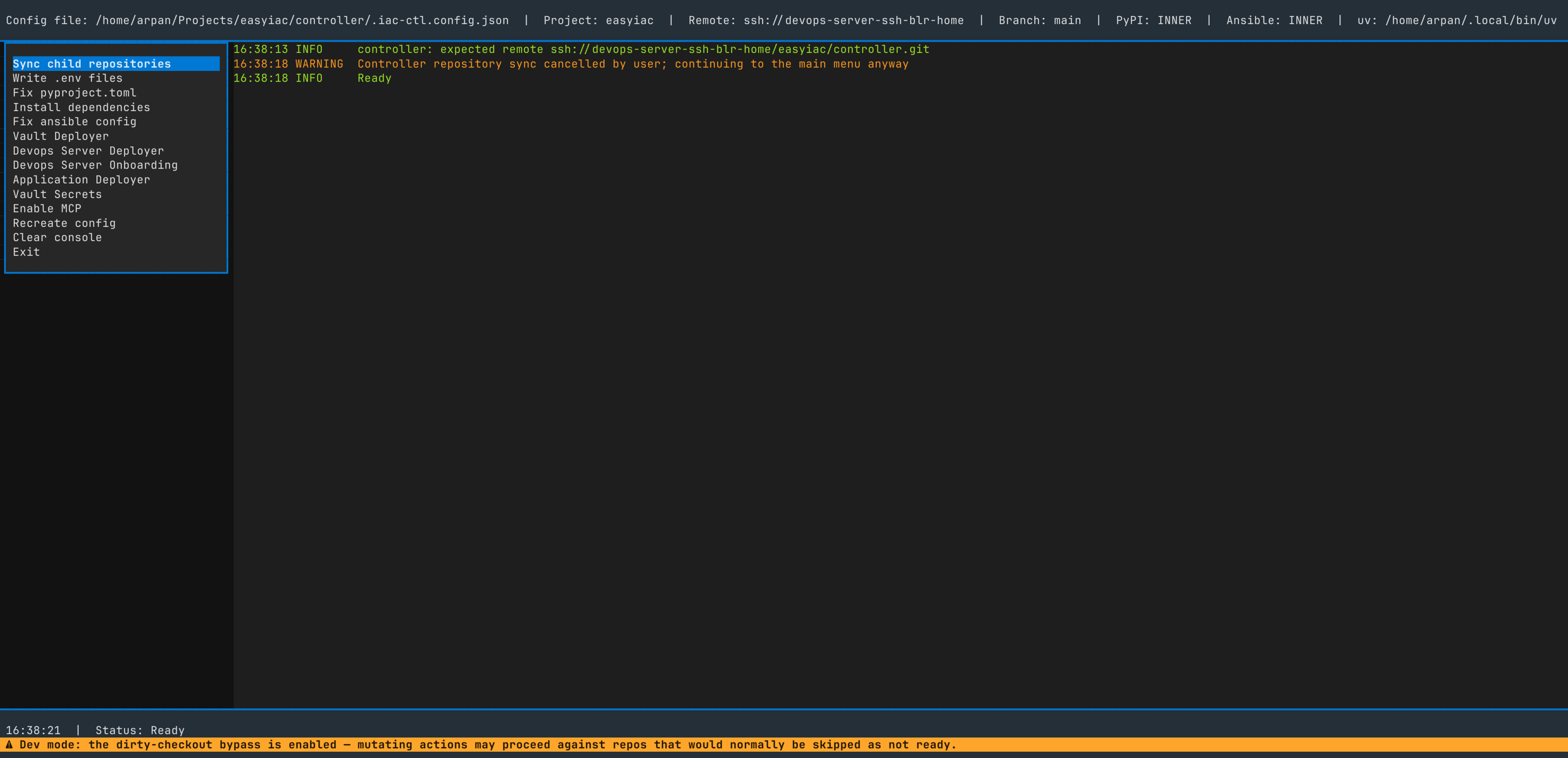
What each of iac-ctl's menu actions does.
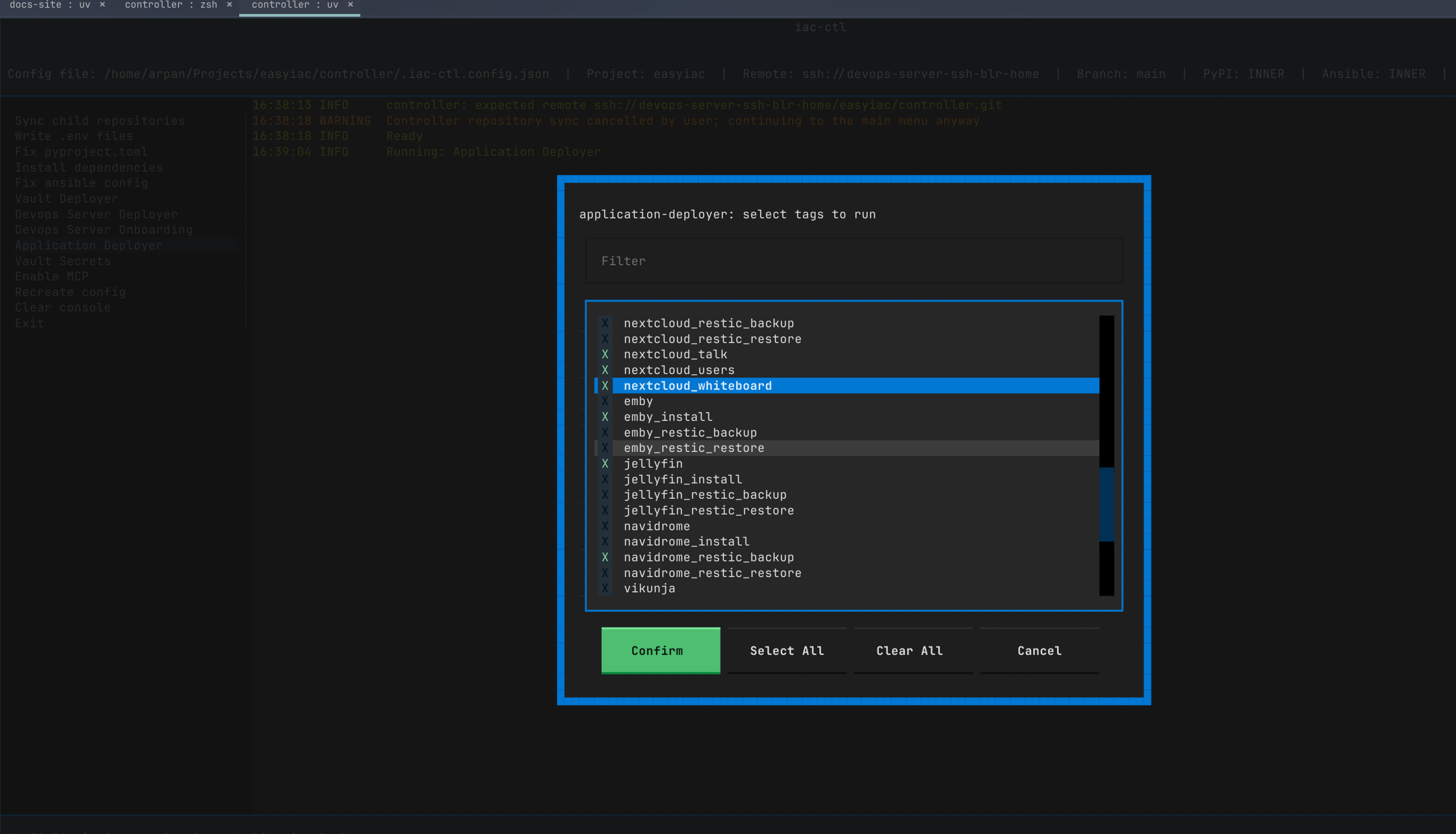
Every prompt has buttons, so Enter and Ctrl+S are optional. When an action walks over several repos, its yes/no prompts show Yes, Skip, and Cancel. Skip moves on to the next repo; Cancel drops the whole action back to the main menu. The last confirmation of an action, and every prompt with no next item to move on to, shows only its primary button (Yes, Submit, or Confirm) and Cancel. Host and tag checklists add a filter box and Select All and Clear All buttons. Large text areas also get Copy, Paste, and Clean. Ctrl+C quits at any time.
Environment variables
| Variable | Required | Default | Used for |
|---|---|---|---|
IAC_CTL_BASE_CONFIG_JSON_FILE | No | ~/.iac-ctl/config.json | Where the persisted config (project code, PyPI index, Ansible requirements source, extra vars, uv, pnpm and rsync paths, controller directory) is read from and written to. |
DEVOPS_SERVER_INVENTORY_HOSTNAME | "Enable MCP", "Devops Server Onboarding", "Application Deployer" | None | The DevOps server host's inventory hostname, set in the config's extra_vars (not the process environment). Locates the DevOps server's registry in Vault for the Docker login, and reaches the devops-server-onboarding scripts and the application-deployer playbook through the subprocess environment; without it the action fails immediately, and the footer shows a warning banner. |
The config's extra_vars are the environment iac-ctl hands to the subprocesses it runs, so they
are where the platform's own variables go:
| Key | Required by | Used for |
|---|---|---|
VAULT_API_ENDPOINT, VAULT_API_KEY, VAULT_CA_CERT_BASE64, VAULT_CLIENT_CERT_BASE64, VAULT_CLIENT_KEY_BASE64 | The Vault pre-check | Connecting to Vault. For a key missing from extra_vars, the Vault client falls back to the process environment variable of the same name. "Enable MCP" copies them from extra_vars into mcp-server's config and ignores the process environment. |
CS_PROJECT_CODE comes from the config's cs_project_code, and PATH from iac-ctl's own process.
Those two, DEBUG, and every key starting with IAC_CTL are reserved in any letter case, so
extra_vars can't set them. Keys that differ only in case count as duplicates.
Screenshots
Main
Application Deployer
Shared checks
Vault pre-check
"Devops Server Deployer", "Application Deployer", "Devops Server Onboarding", "Vault Secrets", and "Enable MCP" run this check as soon as they're selected, before any prompt. It:
- Logs a warning and stops if any of the five Vault connection fields is missing from both the
config's
extra_varsand the process environment. - Connects and lists the config's
cs_project_codebucket, logging a warning and stopping if that fails.
On failure, the reason also appears as the action's status message.
"Vault Deployer" skips this check. It deploys Vault itself, so it can't rely on Vault being up. "Dashboard Deployer" and "Documentation" also skip it because they read from the process environment rather than Vault. The other deployers ("Devops Server Deployer", "Application Deployer") and the onboarding scripts read their secrets and per-host config from Vault.
Write .env files
Walks the controller repo and every repo in ChildRepository, and writes .env from the config's
extra_vars in each one that exists locally, as export KEY='value' lines. A missing .env is
created without asking. An existing one (file, symlink, or directory) is
deleted and rewritten only after the user confirms. extra_vars can't contain a reserved key,
including CS_PROJECT_CODE (matched case-insensitively), because iac-ctl manages those values.
Apply repository templates
Walks the controller repo and every repo in ChildRepository that exists locally. For each one it
checks whether the repo is the directory iac-ctl is running
from. If it is, an extra prompt warns that applying the templates there could affect the running process, and
declining skips that repo. It then asks once whether to apply the repository templates. On
confirmation it writes:
| Files | When |
|---|---|
An empty README.md | Every repo that doesn't have one |
A WTFPL LICENSE, overwritten | Every repo |
.yamllint, overwritten with the baseline config | Every repo |
.git-hooks/pre-commit, executable (see below) | Every repo |
.gitleaks.toml, required keys merged in | Every repo |
.venv, uv.lock, pyproject.toml (see below) | Only if the repo has pyproject.toml |
package.json, node_modules, lock files | Only if the repo has package.json |
requirements.yml, ansible.cfg, .ansible-lint | Only if the repo has requirements.yml |
.git-hooks/pre-commit is the gitleaks hook and the repo's only pre-commit hook: any other
pre-commit* file in .git-hooks is deleted.
.gitleaks.toml is parsed and only its title (Gitleaks development) and [extend] useDefault = true
are set; the file is created if missing, and every other key, table, and comment stays as it was.
For a repo with a pyproject.toml, it:
- Deletes
.venvanduv.lock. - Rewrites
pyproject.tomlagainst the config'spypi_remote_source, and sets[project]'sdescription(from the repo's entry inChildRepository, orCONTROLLER_DESCRIPTIONfor the controller) andversion(the controller's own version, shown in the TUI header).rewrite_pyproject_toml()defines exactly what changes. - Runs
uv lockusing the config'suv_path.
For a repo with a package.json, it:
- Sets
name(the repo's name),version(the controller's own version), anddescription(as forpyproject.toml), leaving every other key as it was. - Deletes
node_modules,package-lock.json,yarn.lock, andpnpm-lock.yaml. - Runs
pnpm install --reporter=append-onlyusing the config'spnpm_path.
For a repo with a requirements.yml at its root, it points that file at the config's
ansible_requirements_source: INNER (the devops-server mirror) or EXTERNAL (upstream GitHub).
It also overwrites ansible.cfg with the INI form of ANSIBLE_CONFIG and .ansible-lint with the
YAML form of ANSIBLE_LINT_CONFIG. ansible-galaxy install belongs to "Install dependencies", which
runs it after uv sync sets up the repo's .venv (and after pnpm install, for a repo that also
has a package.json).
Install dependencies
Walks the controller repo and every repo in ChildRepository that has a pyproject.toml or a
package.json, asking per repo whether to "install all dependencies". The prompt doesn't name a
tool because the action covers more than one. On confirmation, a repo with a pyproject.toml has
its .venv deleted and uv sync --locked --managed-python --all-extras --all-packages --no-progress run
using the config's uv_path. A repo with a package.json then gets
pnpm install --frozen-lockfile --reporter=append-only run using the config's pnpm_path;
--frozen-lockfile fails rather than rewriting the lock file.
--locked fails rather than rewriting uv.lock, so an out-of-sync checkout has nothing to lose.
When the repo is the directory iac-ctl is running from,
an extra prompt warns that installing there could affect the running process.
If the repo has a requirements.yml, it then runs
uv --offline run --no-sync ansible-galaxy install -r requirements.yml --force -vvv.
uv sync has just put Ansible in .venv, so a failure here is a real error: a warning names the
repo and the walk moves on. The "Running..." overlay's status line shows which repo is in progress.
Enable MCP
Rotates the platform's mcp-server config. It fails immediately if DEVOPS_SERVER_INVENTORY_HOSTNAME
is missing from the config's extra_vars; the footer shows a warning banner while it is missing. After the Vault pre-check and one
Yes/Cancel prompt, it logs the Docker SDK client into the DevOps server's container registry (registry address and
admin API token from Vault's <project_code>/devops-server/hosts/<DEVOPS_SERVER_INVENTORY_HOSTNAME>/apps/scm/generated,
admin user name from the DevOps server API, called with the Root CA from Vault's
<project_code>/certificate-authority/root-ca as the trusted certificate), then:
- Generates a new bearer secret and a random port.
- Builds a JSON value from the config's
cs_project_code,mcp_transport=streamable-http,mcp_server_host=0.0.0.0, the port and secret, and the Vault connection fields in the config'sextra_vars. - Removes any existing
controller-mcp-servercontainer, rebuilds the image from mcp-server'sDockerfile, and runs it on127.0.0.1:<port>with the JSON value passed straight into the container. No config file is written or mounted. If the image build fails, its output is logged as errors before the action stops. It then waits, for up to 90 seconds, for the container to report healthy. - Writes or updates a
controller-mcp-serverentry in the.mcp.jsonof the controller repo and of every repo inChildRepositorythat exists locally, pointing athttp://127.0.0.1:<port>/mcpwith anAuthorization: Bearer <secret>header. Other entries in each file stay as they are, and a file that isn't a valid JSON object is left untouched with a warning.
.mcp.json is a local file.
Vault Deployer
Runs vault-deployer's playbook.yml against hosts and tags picked at run time:
- If the repo has no
playbook.yml, it logs a warning and stops. - It runs
ansible-playbook --list-hostsand--list-tagsthrough the config'suv_pathand parses the output into two lists. Tags containingdanger,cleanup, orneverare left out of the tag list. If either command fails or either list is empty, it logs a warning and stops. - The user checks off hosts, then tags. Nothing starts checked. Confirm shows an inline error until at least one item is checked. Cancel or Escape stops the whole action.
- A final Yes/Cancel prompt lists the chosen hosts and tags.
- The playbook runs with the hosts joined into
-l host1,host2and the tags into--tags tag1,tag2.
vault-deployer's playbook fails when its inventory holds more than one remote host, whatever hosts
are checked. That check runs in the playbook, not in iac-ctl.
Devops Server Deployer
Runs the Vault pre-check, then devops-server-deployer's playbook.yml with
the same steps as "Vault Deployer". The tag list covers every service on the DevOps server
host, one prefix each (for example pypi_mirror_*, database_*, scm_*).
Devops Server Onboarding
Runs one of devops-server-onboarding's console scripts. Each script reads its config from Vault on
startup.
- It fails immediately if
DEVOPS_SERVER_INVENTORY_HOSTNAMEis missing from the config'sextra_vars, before any prompt or Vault call. The footer shows a warning banner while it is missing. - It runs the Vault pre-check.
- It lists every command under
[project.scripts]in the repo'spyproject.toml. If the file is missing or the table is empty, it logs a warning and stops. - The user picks one command from a single-choice list and confirms with Yes/Cancel.
- It runs
uv --offline run --no-sync --no-progress <command>through the config'suv_pathindevops-server-onboarding, with the config'sextra_vars,CS_PROJECT_CODE, andPATHas the process's environment.
"Install dependencies" installs these scripts; this action runs no playbook.
Application Deployer
Fails immediately if DEVOPS_SERVER_INVENTORY_HOSTNAME is missing from the config's extra_vars, since
the playbook reads the DevOps server's registry details from Vault under that hostname. Then runs the
Vault pre-check and application-deployer's playbook.yml with the
same steps as "Vault Deployer". Its inventory spans several hosts and the playbook accepts more than
one, so checking several hosts is a normal run.
Dashboard Deployer
Runs one of dashboard's console scripts (currently dashboard-deployer, which uploads the stack
over SSH and starts it with Docker Compose). dashboard reads its settings from the process
environment, plus its own .env for any key the environment doesn't set, not Vault, so this action skips the Vault pre-check. Otherwise it
follows the same steps as "Devops Server Onboarding": list the [project.scripts] commands in the
repo's pyproject.toml (a missing file or empty table logs a warning and stops), pick one, confirm
with Yes/Cancel, then run uv --offline run --no-sync --no-progress <command> in dashboard with the config's extra_vars, CS_PROJECT_CODE, and PATH as the process's environment.
Documentation
Runs one of documentation's package.json scripts (for example start, build, diagram, or
deploy:preview). documentation is a Docusaurus site published separately from the platform's
services. It reads its settings from the process environment, not Vault, so this action skips the
Vault pre-check.
- It lists every entry under
scriptsin the repo'spackage.json. If the file is missing or the object is empty, it logs a warning and stops. - The user picks one script from a single-choice list and confirms with Yes/Cancel.
- It runs
pnpm run <script>through the config'spnpm_pathindocumentation, with the config'sextra_vars,CS_PROJECT_CODE, andPATHas the process's environment.
"Install dependencies" installs the site's packages; this action does not.
Vault Secrets
Reads, writes, lists, or deletes one Vault secret. After the Vault pre-check, it
asks for a key as a bucket/key path, prefilled with the config's cs_project_code. The key must be
non-blank and start with that code. It then asks which operation to run. Cancel or Escape on either
prompt backs out before any operation runs.
read/write need a full bucket/key path. A bare bucket fails when the operation runs, like any
other Vault error. list accepts a bare bucket and lists its root, and delete accepts one too (see
below).
- read/write: fetches the current value and opens it, pretty-printed, in the same large text area
"Recreate config" uses for
extra_vars. A missing or empty secret starts as{}. Cancel backs out without validating. Submit re-prompts until the text parses as a JSON object, then asks for a final Yes/Cancel before writing. The write replaces the whole previous value. Since this shows the current value first, there's no separate read operation. - list: logs the child keys directly under the path.
- delete: asks for a final Yes/Cancel, then deletes the key's full history and, recursively, every
child key under it. A bare bucket is accepted here and deletes the bucket's whole KV mount: every
secret and all history in it. The key prompt is prefilled with the bare
cs_project_code, so deleting without extending the path targets the project's entire bucket. This can't be undone.
Recreate config
Re-runs the prompts create_config asks on first launch (project code, PyPI index,
Ansible requirements source, extra vars, uv, pnpm and rsync paths, controller directory) and overwrites the saved
config with the answers. These are the only prompts with no Cancel button and no Escape. On a first
run there's no main menu to fall back to, so once started they can't be backed out of. Each still
has a Submit button.
It then runs the Vault pre-check against the new config, so the footer's Vault warning reflects the new config right away.
Toggle session status
Shows or hides the session-status bar under the header. The bar lists the config file path, project
code, PyPI and Ansible sources, uv, pnpm and rsync paths, the Python interpreter, the controller
directory, how many extra_vars keys are set (never their values), and runtime tool versions
(uv, pnpm, rsync, Python). It starts hidden and keeps the last choice until toggled again.
Clear console
Empties the log panel on the right.
Exit
Quits iac-ctl. Ctrl+C does the same from anywhere, including an open prompt.
Documentation
The platform's child repos, deployment order, and architecture diagram are in
documentation/README.md. The documentation repo also holds the
prerequisites for the platform, the OpenWrt router's configuration and rebuild checklist, and the
documentation site.